
AI automation for patent law firms. Inside the systems and network you already run.
We automate correspondence intake, incoming invoices and follow-ups on top of the IP management system you already use. By default the language model runs on a server in your network, and you decide where your team signs off.
- of emails filed automatically
- 89 %of emails filed automatically
- documents filed to the matter in 7 weeks
- 2,200+documents filed to the matter in 7 weeks
- of incoming invoices posted fully automatically
- over 92 %of incoming invoices posted fully automatically
- technical errors per month
- 0technical errors per month
From production use at patent law firms, 2026
„A huge relief.“
„Really great!“
- Several firms already in production
- Connected to PatOrg and Patricia
- Confidentiality and data processing terms in our standard contract
What changes for your team
Up to 92 % of invoice data is extracted correctly, measured on real invoices.
- Less data entryInvoices and correspondence land in the matter, already recorded.
- More time for real workYour team focuses on the cases that need judgment.
- Nothing gets lostEvery item is logged; anything unclear is flagged.
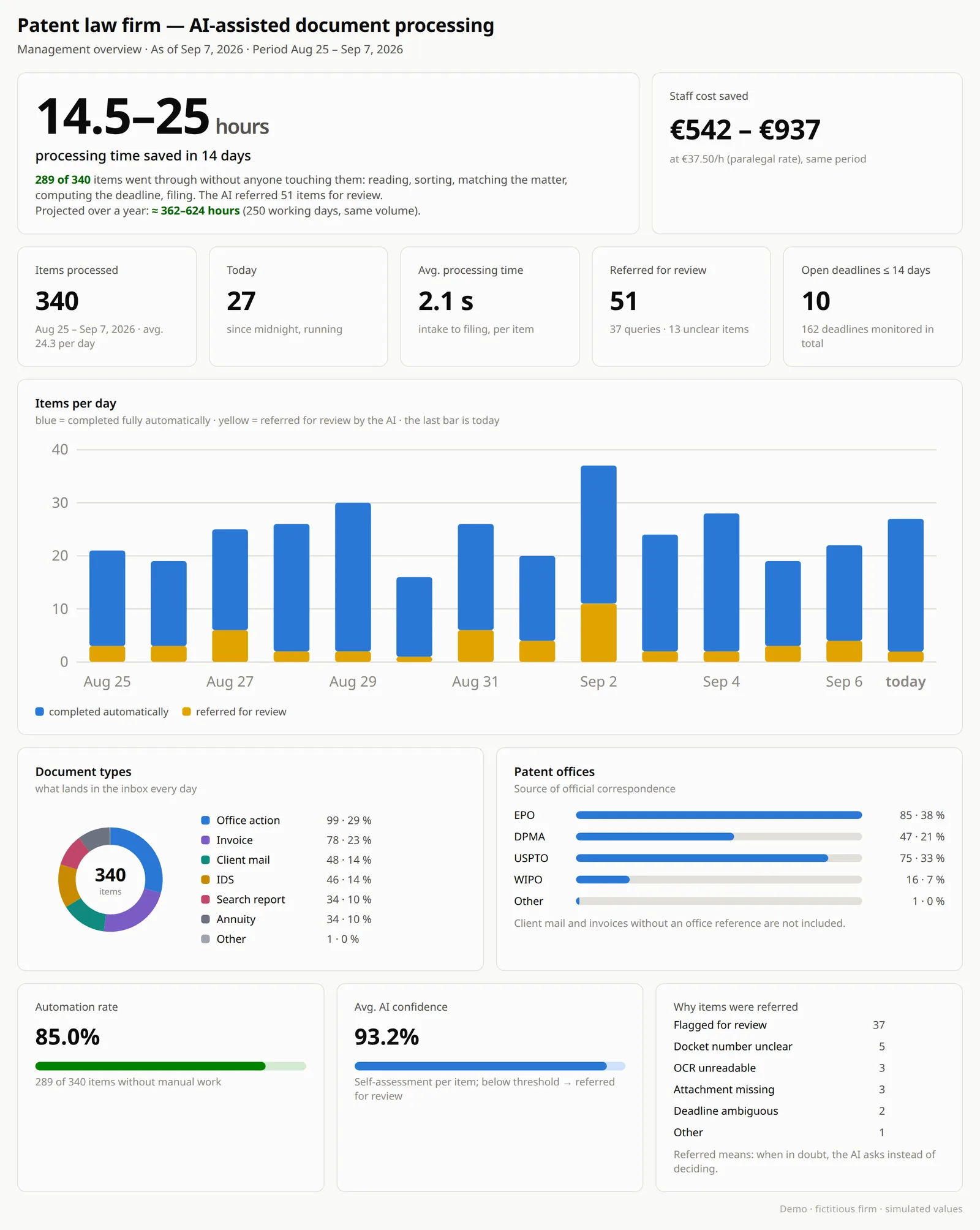
- Visibility for partnersA dashboard shows what ran automatically and what was reviewed.
What we automate
Two areas, one infrastructure inside your network.
For paralegals and accounting
Five modules in production
- Correspondence intake
Classify emails and attachments, match them to the right matter, file them, record the event in your IP management system and draft a reply.
- Incoming invoices
Read incoming invoices, for example from foreign associates, match them to the matter and record them as disbursements in your IP management system.
- Follow-ups
Create follow-up entries in your IP management system as soon as a matter needs tracking, linked to the triggering document.
- Annuities
Trigger, process and document recurring annuity workflows.
- Billing
Prepare bills from recorded services and disbursements, as a draft for your firm to approve.
For attorneys
PilotOffice action processing as a pilot
Intake, filing, cited prior art and client report drafts. Judgment and signature stay with you.
- Capture incoming mail
- Recognize and read it
- File to the matter
- Identify cited prior art
- Retrieve the cited documents
- Deadline proposal
- Client report as a draft
- Summary and response draft
Replaces software you pay extra for today
Already in use at law firms
At law firms, filing and billing already run through the automation instead of a separate program. The licenses you save help pay for the automation.
Your document archive (DMS)
You pay for a full DMS and mostly use it for filing.
- Immutable, logged filing with proof of integrity
- Retention periods and export for audits
- Filled directly by the automation, with a web interface and roles
Your billing program
Invoices are created where services are already recorded.
- Four-eyes approval, gap-free invoice numbers
- E-invoicing (XRechnung, ZUGFeRD), foreign currencies at ECB rates
- Structured booking data for accounting and your tax advisor
Your IP management system and your deadline control stay in charge. What gets replaced is what costs extra alongside them.
From inbox to recorded matter event, with sign-off where you want it
Correspondence intake is where most firms start. Five steps that are manual today:
Office action, client mail, associate report, invoice or marketing?
By docket number, official application number and parties.
The email and attachments land in your agreed filing structure.
The event is recorded in your IP management system, as if entered by hand.
An acknowledgment or reply is waiting as a draft.
You decide which steps run automatically and where a person signs off. Unclear cases go to your team instead of being guessed.
Built for client confidentiality
Client data and unpublished applications belong inside the firm. The architecture is designed around that:
Runs inside your network
Automation and language model run on a server in your firm network.
Confidentiality in the contract
Written confidentiality obligations and a data processing agreement.
People sign off
You decide what runs automatically. Unclear cases go to your team.
Three steps to production
You see the automation working on your real process before you decide on anything more.
Pilot
An easy start, without a long-term commitment.
- We start where it helps most, usually correspondence intake
- Your real correspondence runs through it
- You see the results, then decide whether to continue
Go-live
The automation moves onto your server.
- Setup on a server in your network
- Proven workflows from the pilot are carried over and adjusted
- Documentation, handover and onboarding for your team
Operation
Module licenses plus operation with an included hour allowance.
- Monitoring, updates and workflow maintenance
- Refinements based on your team’s corrections
- New modules as needed, announced in writing in advance
We quote concrete prices in the call, because they depend on volume and modules.
Frequently asked questions
We already have an IP management system. Why would we need this?
That is the point. We do not replace your system; the automation operates it through its API. It reads incoming correspondence, matches matters, records events and prepares replies. Your systems stay, and the manual work between them goes away.
Where does our data live?
On a server in your network. The language model runs locally by default, so client data and unpublished applications do not leave the firm for processing. We only use a cloud model if you approve it, in a region you agree to and under a data processing agreement.
How is confidentiality handled contractually?
Our standard contract includes written confidentiality obligations and a data processing agreement. Anyone we involve is bound to confidentiality in writing, and when the contract ends, data is deleted or returned.
Who is responsible if the automation makes a mistake?
Responsibility stays with qualified people at your firm. You decide what may run automatically and where someone signs off. Critical steps are only prepared, never completed on their own. Unclear cases go to your team instead of being guessed, and every automated action is logged.
Are we locked in?
The automation runs on your server. The configuration built for your firm belongs to you and is documented at handover. Language models are interchangeable; we do not tie you to a model provider.
What does it cost?
You start with a pilot and decide afterwards whether to continue. Operation means a one-time go-live and ongoing module licenses plus operation with an included hour allowance. Licenses you no longer need, such as a DMS, often cover part of it. We quote concrete numbers in the call.
Talk to us for 30 minutes
No slide deck. We look at your correspondence and your IP management system and tell you plainly whether automation pays off, and where.
You talk directly to the founder.
Uhlandstr. 12
71729 Erdmannhausen
Germany
Data Platform & DataOps
Open-source data infrastructure for companies, and for law firms a knowledge base: work instructions, template letters and past filings, searchable by asking a question.