
Skip to content
Patent firm automation

Modules that operate your IP management system

Each module automates a workflow that is manual today, on the systems you already have. It runs on a server in your network, with sign-off where you decide.

At a glance

lumadata automates recurring back-office workflows at patent law firms. Emails and attachments are classified, matched to the right matter, filed and recorded as events in the IP management system. Incoming invoices are read and recorded as disbursements. The automation runs on a server inside the firm network with a local language model, operates existing systems through their APIs and leaves critical steps to human sign-off.

Who it is for
Patent law firms
Where it runs
A server in your firm network
Language model
Local by default, cloud only if you approve
Connections
IP management, accounting, DMS, email, file shares
How to start
A pilot, then you decide
In production

Modules in production

These modules run in production at patent law firms today.

Correspondence intake in five steps

1
Classify

Office action, client mail, associate report, invoice or marketing?

2
Match to matter

By docket number, official application number and parties.

3
File

The email and attachments land in your agreed filing structure.

4
Record

The event is recorded in your IP management system, as if entered by hand.

Sign-off
5
Draft reply

An acknowledgment or reply is waiting as a draft.

You decide which steps run automatically and where a person signs off. Unclear cases go to your team instead of being guessed.

Correspondence intake

In production

Classify emails and attachments, match them to the right matter, file them, record the event in your IP management system and draft a reply.

What happens behind the scenes
  1. 1Intake: Incoming mail and copies of outgoing mail land in a filing mailbox.
  2. 2Fetch: Microsoft 365 or IMAP, every few minutes.
  3. 3Recognize: A language model identifies docket number, proceeding and type of mail.
  4. 4File: Into the matter folder on the file share, or via API into the IP management system.
  5. 5Log: Every item is logged and shown on the status dashboard.
  6. 6Monitor: Alert rules flag anomalies. When your team corrects a match, it is refiled automatically.

Your team reviews anomalies; the automation carries out the correction.
Incoming invoices

In production

Read incoming invoices, for example from foreign associates, match them to the matter and record them as disbursements in your IP management system.

What happens behind the scenes
  1. 1Read mailbox: Microsoft 365: new mail in the invoice mailbox, every minute.
  2. 2Sort: Rules separate invoices, queries and other mail; office overhead invoices are set aside.
  3. 3Read invoice: The relevant PDF is selected; text recognition and a language model read the fields.
  4. 4Check matter: IP management system API: look up the matter; check reference, duplicates and ECB exchange rate.
  5. 5Post entry: IP management system API: create the entry. The intent to post is logged first.
  6. 6File documents: IP management system API: PDF and email to the matter, plus a copy on the file share.
  7. 7Follow-up and receipt: Create a follow-up by fixed rule; send an acknowledgment as a reply in the thread.
  8. 8Verify: Read the result back from the system, log it, set a category in the mailbox.

The system never guesses: without a confirmed matter reference nothing is posted. Open cases land visibly in their own category for your team.

Follow-ups

In production

Create follow-up entries in your IP management system as soon as a matter needs tracking, linked to the triggering document.

  • Reason and owner set by your rules
  • Shows up in the follow-up list your team already uses

Annuities

In production

Trigger, process and document recurring annuity workflows.

  • Processes incoming instructions and confirmations
  • Documents every step in the matter

Billing

In production

Prepare bills from recorded services and disbursements, as a draft for your firm to approve.

  • Collects services and disbursements per matter
  • Your team reviews and approves the draft
Pilot · On request

More modules

For attorneys, and for whatever makes your firm different.

  • Office action processing

    Pilot

    Prep work on office actions: filing, retrieving cited prior art, deadline proposals, client report drafts. Offered to attorneys as a pilot.

    See the status per step
  • Payment reminders

    On request

    Monitor open items and prepare reminders as drafts.

  • Translation workflow

    On request

    Send documents to a translation service of your choice (under a data processing agreement) and file the result back to the matter.

  • Legacy mail backfill

    On request

    Match existing email archives to the right matters retroactively, as a one-time project.

  • Knowledge base

    On request

    Work instructions, template letters and past filings searchable by asking a question, with a local language model inside your network.

  • Custom workflows

    On request

    Whatever makes your firm different, we build as your own configuration. It belongs to you.

Fewer licenses

Replaces software you pay extra for today

Already in use at law firms

At law firms, filing and billing already run through the automation instead of a separate program. The licenses you save help pay for the automation.

Your document archive (DMS)

You pay for a full DMS and mostly use it for filing.

  • Immutable, logged filing with proof of integrity
  • Retention periods and export for audits
  • Filled directly by the automation, with a web interface and roles

Your billing program

Invoices are created where services are already recorded.

  • Four-eyes approval, gap-free invoice numbers
  • E-invoicing (XRechnung, ZUGFeRD), foreign currencies at ECB rates
  • Structured booking data for accounting and your tax advisor

Your IP management system and your deadline control stay in charge. What gets replaced is what costs extra alongside them.

Security & confidentiality

Technology: everything inside your network

The automation runs on a dedicated server in your firm network, sized for your volume. The language model runs there, locally.

Your firm network
Incoming email
Automation server

Local language model · workflows · monitoring

IP management system

e.g. your docketing system

Processing inside your network
Cloud model (under DPA)
only if you approve it, e.g. for translations
  • Local language model by default
  • Cloud models only if you approve them, under a data processing agreement, e.g. for translations
  • Connects to your IP management system through APIs, not screen recording
  • Language models are interchangeable; you are not tied to one provider

Connected

We connect to whatever your firm uses.

  • IP management system e.g. PatOrg or Patricia: matters, events, documents, deadlines
  • Accounting and tax advisor structured booking data, e-invoicing (XRechnung, ZUGFeRD)
  • Document archive (DMS) existing archives or our own filing
  • Email Microsoft 365 / Outlook, Exchange, IMAP
  • File storage file servers and network drives inside your network
  • Patent offices public interfaces, e.g. of the European Patent Office
  • Monitoring dashboards and alert rules for operation

Monitoring

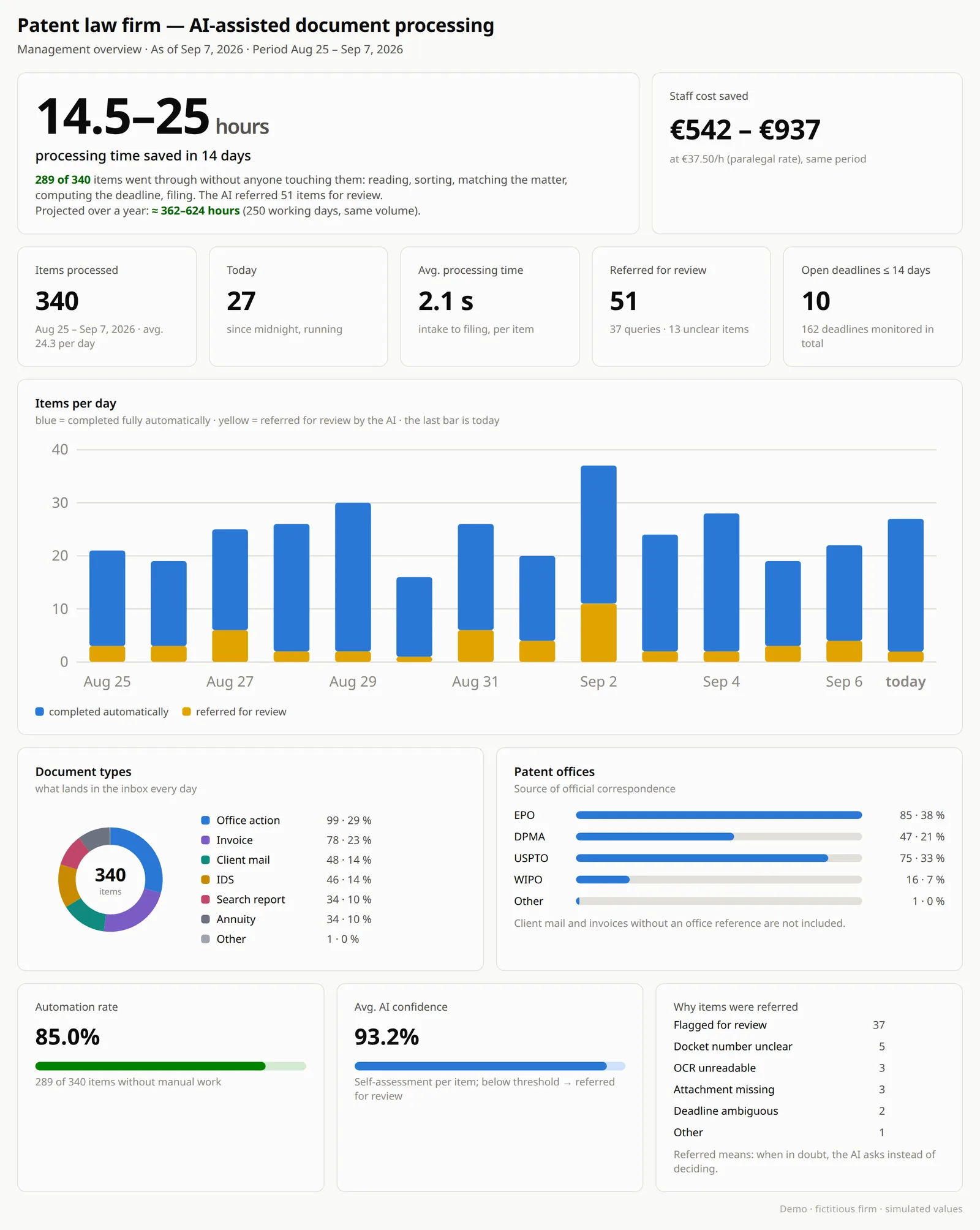
When your team corrects a proposal, that is not a failure in the process. It is the feedback channel: we refine rules and matching, and the share of fully automated cases goes up.

  • Dashboards for processed items and automation rate
  • Alert rules flag anomalies before anything gets stuck
  • Every automated action is logged and traceable
  • Unclear cases are escalated to your team
Example management dashboard: items processed per day, automation rate, document types and patent offices
Stay on top of it: example of a management dashboard.
Is it a fit?

Who it is for

A good fit if

  • you are a patent law firm. In automation, we work only with patent law firms.
  • incoming correspondence and invoices noticeably tie up your team.
  • you pay for extra software next to your IP management system, such as a DMS or a billing program.
  • you want client data to stay inside your network.

Probably not a fit if

  • you are looking for off-the-shelf software with its own interface.
  • you expect AI to own deadlines or filings without human review.
  • your volume is so low that the setup would not pay off.

What a single module moves

An example for incoming invoices. The assumptions are stated, so you can check it against your own numbers.

Incoming invoices per month
100
Minutes of manual work per invoice (assumption)
5 to 8
Hours of data entry per month
8 to 13 h

How much of that goes away depends on which cases you allow to run fully automated. In the pilot, you see it on your own correspondence.

FAQ

Frequently asked questions

Which IP management systems are supported?

PatOrg, Patricia and other IP management systems with an interface. We connect accounting, document archives, email and file storage the same way.

What hardware does the firm need?

A dedicated server in your network, sized for your volume. We tell you exactly what is needed before we start.

How long does it take to go live?

That depends on the scope and on your IT. The pilot is cut so you see results early. We agree on the timeline together before we start.

Does it read deadlines from office actions?

That is part of office action processing, which we offer to attorneys as a pilot. Deadlines are proposed and only docketed once your team approves them.

Does our team have to learn new software?

No. The results show up in your IP management system and your mailbox. The only change is that events are already recorded and drafts are waiting.

Is this just another software vendor?

There is no new interface for your team to learn. The automation works in the background, and your team sees the results where it already works.

Can we keep a second review step?

Yes. Where you want a second pair of eyes, we build it in as a fixed step. Deliberate checkpoints are part of good automation.

Could we build this ourselves?

Many firms have built pieces, such as a script for importing invoices or a macro for filing. The difference is the whole process, from the email to the recorded event and follow-up, stable in daily operation, monitored and maintained. Feel free to ask us where your current solution stops.

How does the team take it?

Nobody is replaced; routine work goes away. Your staff stay in control: their corrections are the feedback channel that raises the automation rate. We take time to introduce it to the team.

Contact

Is this a fit for your firm?

In the intro call we look at your correspondence and your IP management system and tell you plainly where automation pays off.

You talk directly to the founder.

Address
lumadata GmbH
Uhlandstr. 12
71729 Erdmannhausen
Germany